How to change the credit card to make a payment?

You can change the credit card to make a payment in the following way.

* You can change credit card information only from a desktop.


1. Click “Settings” on header and “Team settings”.
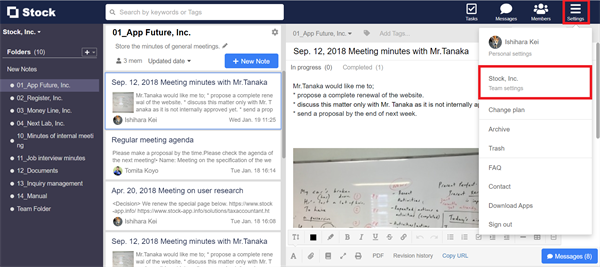

How to change the credit card to make a payment on Stock_1

2. Click “Payment information” in the menu on the left side and click “Change”.
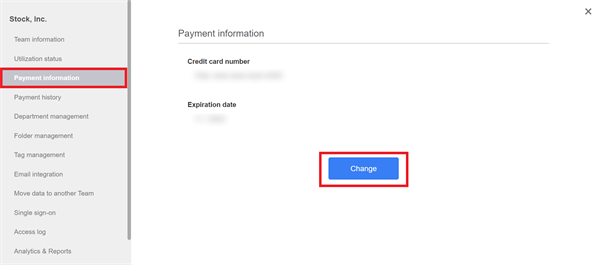

How to change the credit card to make a payment on Stock_2

3. Enter credit card information you want to use.
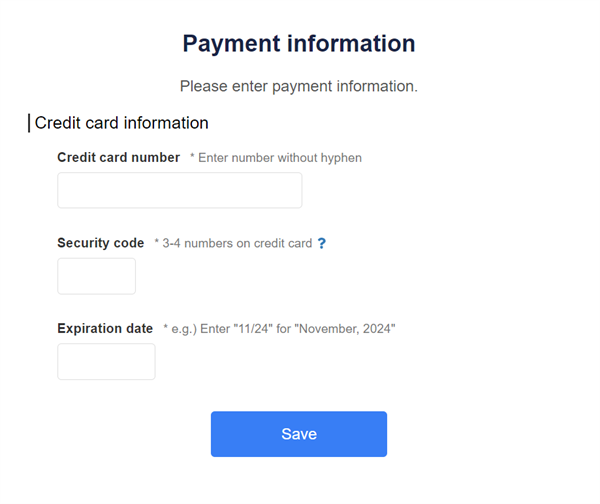

How to change the credit card to make a payment on Stock_3

Contact using a contact form

If you have any questions or feedback, feel free to contact us using a contact form.